Mark requests as spam
Audience:
•
Version: 12
Some tooltip text!
• 2 minutes to read
• 2 minutes to read
Note
You need the Can mark requests as Spam functional right.
Use Mark as Spam to classify fraudulent or unwanted requests. Spam requests are excluded from all views, searches, reports, and selections, and do not count toward the Resolved service requests metric.
You can mark requests as spam from three places:
| Context | Where to find Mark as Spam |
|---|---|
| One or more requests in a list | The context menu (right-click) |
| A single open request | The Task menu |
| A selection of requests | The Task menu |
Requests marked as spam move to the Recycle bin, where you can restore them if needed. They are permanently deleted from the Recycle bin after a configurable period (default: 14 days).
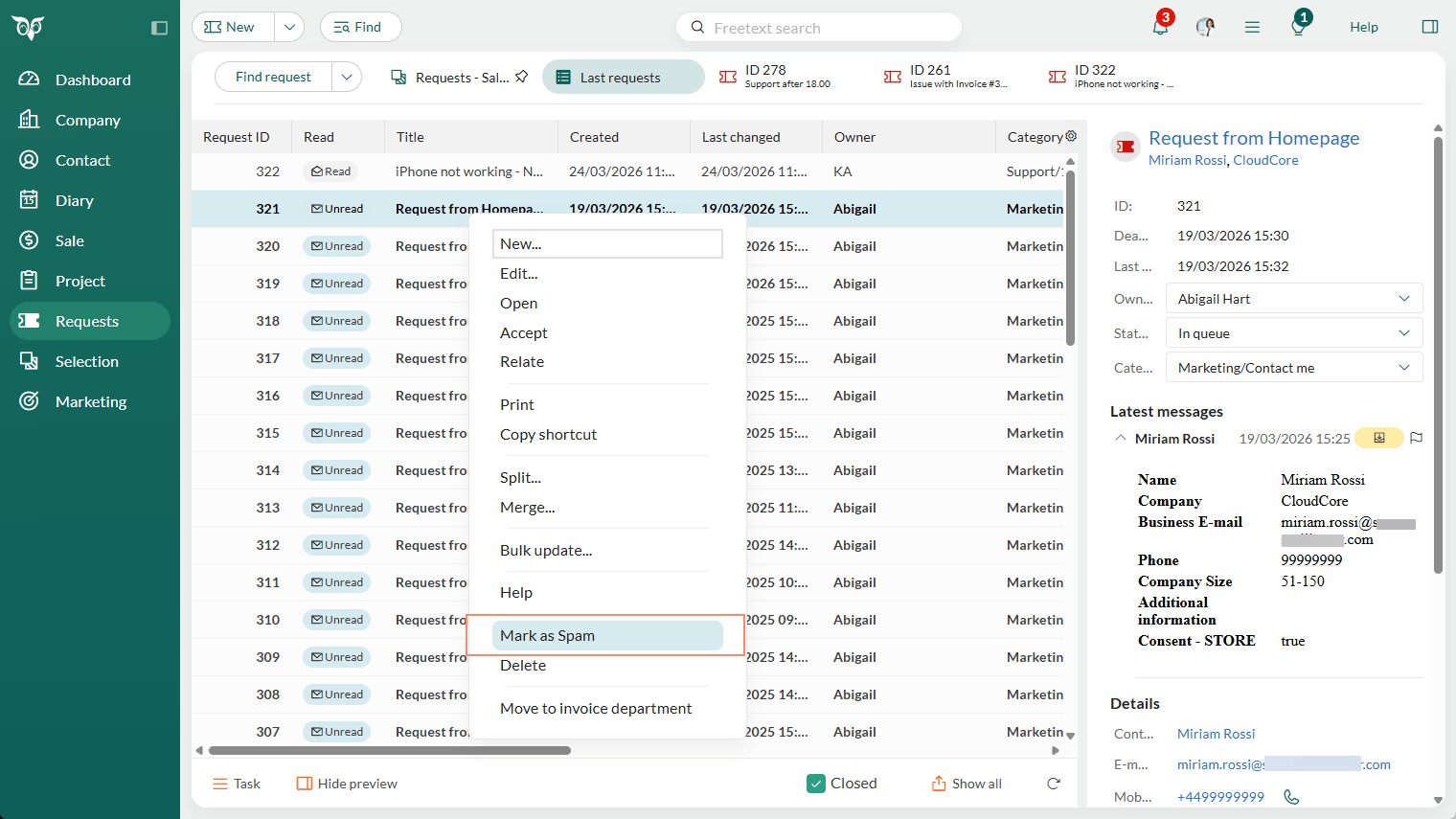
Mark requests as spam from a list
When viewing a list of requests:
Select one or more requests.
Right-click the selection and select Mark as Spam from the context menu.
In the confirmation dialog, select Yes to confirm, or No to cancel.
Mark a single request as spam
- Open the request.
- Click and select Mark as Spam.
- In the confirmation dialog, select Yes to confirm, or No to cancel.