SuperOffice CRM Suite
SuperOffice CRM Suite provides a single, integrated CRM platform that covers sales, marketing, and service. All users in your organization share one plan, and the plan determines which features are available across your entire organization.
Plans
Five plans are available. Plans are cumulative — each plan includes everything in the plans below it.
| Plan | Description |
|---|---|
| Starter | Start building customer relationships. Covers sales pipeline management, service request handling, marketing campaigns, contact and document management, and built-in data protection tools. |
| Core | Boost productivity and collaboration. Adds mobile CRM, workflow automation, built-in AI support, project management, dashboard analytics, calendar synchronization, and CRM customization. |
| Growth | Accelerate revenue with targets and insight. Adds sales target and KPI tracking, data-driven insights, and CRM-ERP integration. |
| Plus | Enhance customer experience and improve retention. Adds advanced service request resolution, automated marketing flows, customer lifecycle management, and natural language search. |
| Super | Run an enterprise-grade sales team. Adds predictive sales insights, unlimited goals and KPI tracking, AI-driven service optimization, and database replication. |
Seat management
All users in your organization share the same plan. A seat is a named user with the Can log in option enabled.
- To give a user access, enable Can log in on their user card in Settings and maintenance > Users.
- To free up a seat without removing the user's data and history, uncheck Can log in instead of deleting the user. Deleting a user is permanent.
You can view seat usage in Settings and maintenance > Licences > SuperOffice tab.
Pricing model
Your subscription has three components:
Base fee: A per-user fee that grants access to the full CRM Suite.
Scaling metrics: Usage-based pricing for high-consumption areas. Your plan includes a base allowance; additional capacity can be purchased in blocks when needed.
Plan limits (fencing): Fixed tier-based limits that differentiate plans. Exceeding a plan limit restricts the related feature until you free up capacity or upgrade your plan.
Scaling metrics
Scaling metrics track ongoing consumption. When your usage exceeds the base allowance included in your plan, additional capacity is billed automatically. Areas subject to scaling pricing include:
- Marketing emails sent
- Resolved service requests
- Storage
Plan limits
Plan limits are fixed per tier. When a limit is reached, the related feature is restricted until you reduce usage or upgrade.
| Limit | Starter | Core | Growth | Plus | Super |
|---|---|---|---|---|---|
| Dashboards | 3 | Unlimited | Unlimited | Unlimited | Unlimited |
| Active projects | 0 | 100 | Unlimited | Unlimited | Unlimited |
| Custom objects | 0 | 0 | 15 | Unlimited | Unlimited |
| Active marketing flows | 0 | 0 | 0 | 10 | Unlimited |
Both running and paused flows count toward the active flow limit on the Plus plan. A paused flow is still considered active because it continues collecting incoming contacts for later processing.
The Restrictions indicator in Settings and maintenance > Licences > Status tab > Database shows your current usage against each plan limit.
| Usage | Indicator | Meaning |
|---|---|---|
| Below 85% | Count shown in black | Normal — no action needed |
| 85% or more | Count shown in yellow | Approaching the limit |
| 100% | Count shown in red | Limit reached — the feature is restricted |
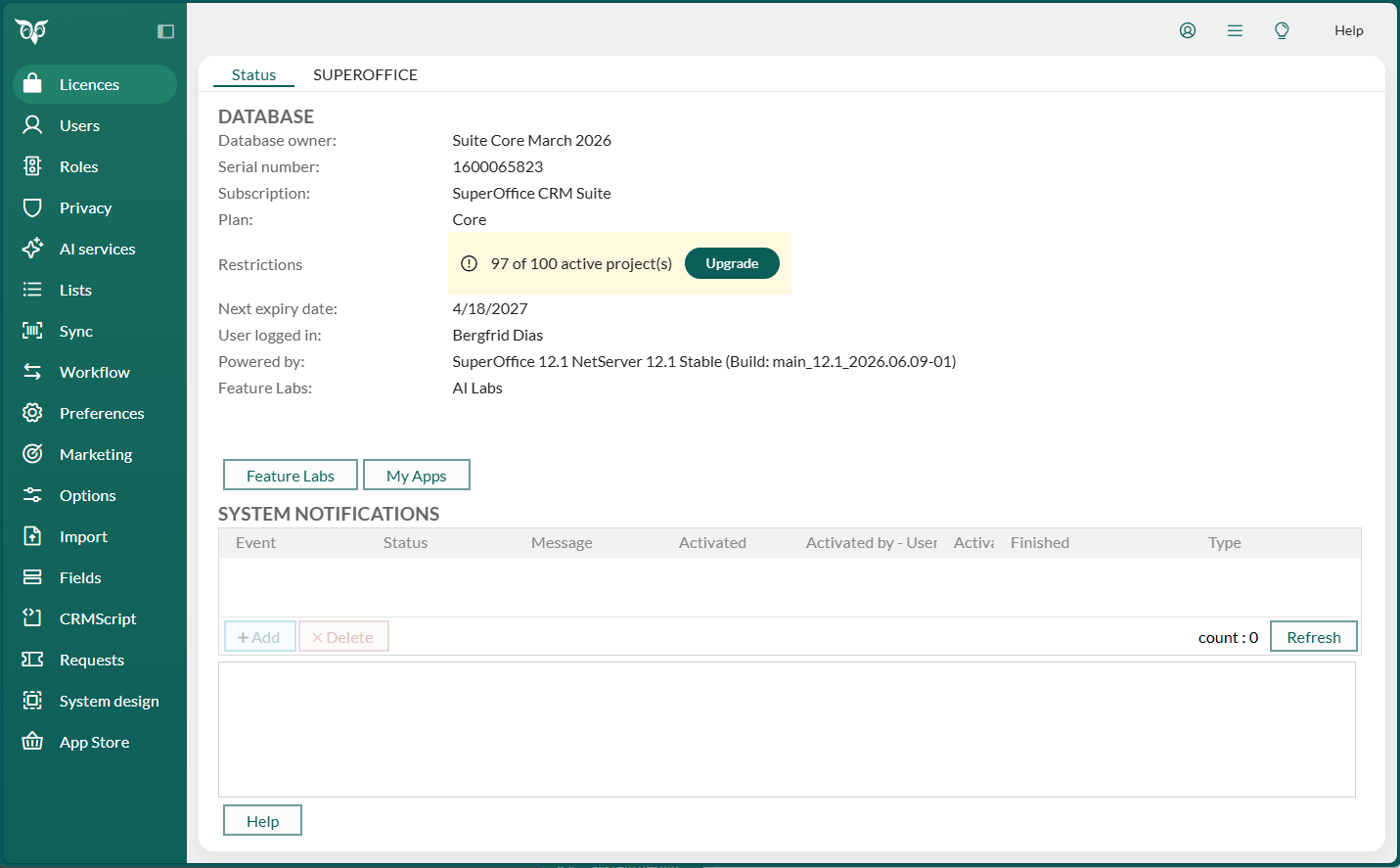
If you are an administrator, an Upgrade button appears next to a warning or stop indicator. Select it to open a contact form to request more capacity or a plan upgrade.
Transition from SuperOffice CRM Online
Organizations migrating from SuperOffice CRM Online (the module-based subscription) are placed on the CRM Suite plan that matches their current license. If you held multiple licenses, your plan is based on your highest-tier license. Transition timing is determined on a per-account basis — you will be contacted.
| Current license | CRM Suite plan |
|---|---|
| Sales Essentials | Core |
| Service Essentials | Core |
| Marketing Essentials | Growth |
| Sales Premium | Growth |
| Service Premium | Growth |
| Marketing Premium | Plus |