How user plans are constructed
User plans in version 10-11
User plans come in two tiers: Essential and Premium
User plans come in three flavors: Sales, Service and Marketing. Flavors can be combined.
So at its simplest we get the Sales-Essential user. At the most complex we get the Sales-Premium-Service-Premium-Marketing-Premium user.
Sales-Essential user
If this is all we have, we get issued the following licenses:
| Name | Type | Description |
|---|---|---|
| server | system | Required for system to work. |
| user | user | To log in |
| web | user | To log in to web |
| pocket-crm-cal | user | To log in to mobile |
| visible-for | user | To allow users to use confidential appointments |
| import | system | Enables the import functionality in admin |
| dash | system | Enables the dashboard functionality |
| document | system | Enables document creation/editing |
| selection | system | Enables selection panel |
| relation | system | Enables relations archive |
| relation-cal | user | Allows user to create/edit relations |
| sale | system | Enables the sales panel |
| sale-cal | user | Allows user to create/edit sales |
| sales-t1 | system | Marker to indicate sales-essentials |
| ten-sales | user | User plan license, defines which user licenses are enabled for the user |
The CAL licenses are per-user licenses. They must be assigned to a specific user in order to work.
The user-plan license is flagged with ExtraFlag = 1, and ExtraInfo = list of user licenses to activate.
The licenses that are automatically enabled by the user plan are hidden, so they don't appear in the license panel.
User plans in version 8-9
User plans come in one tier.
User plans come in five flavors: Sales, Service, Marketing, and Complete, plus a reduced Standard CRM User.
Standard CRM user
| Name | Type | Description |
|---|---|---|
| server | system | Required for system to work. |
| user | user | To log in |
| web | user | To log in to web |
| pocket-crm-cal | user | To log in to mobile |
| visible-for | user | To allow users to use confidential appointments |
| import | system | Enables the import functionality in admin |
| dash | system | Enables the dashboard functionality |
| document | system | Enables document creation/editing |
| selection | system | Enables selection panel |
| selection-cal | user | Allows user to create/edit selections |
| selection-combined-cal | user | Enables combination selection type for user |
| relation | system | Enables relations archive |
| relation-cal | user | Allows user to create/edit relations |
| project | system | Enables the project panel |
| project-cal | user | Allows user to create/edit projects |
| mail-merge-cal | user | Enables basic mail-merge functionality |
| sales-t1 | system | Marker to indicate sales-essentials |
| superlicense-contact-manager | user | User plan license, defines which user licenses are enabled for the user |
Again, the user plan license has extra flags = 1, and a list of licenses to enable automatically stored in extra info.
Note that this user plan includes projects, but the sales-essential user plan does not. Projects are a premium feature in the 10-11 user plans.
Standard CRM user does not have sales access, but the sales-essential user plan does.
So checking for the user plan means more work when the price list changes. Checking the module licenses means everything just keeps working as before.
User plans in version 6 and 7
User plans did not exist. Licenses were sold individually and you could mix and match.
You could buy 10 user licenses, 7 web licenses, 5 windows licenses, and let some users log in via web, some via windows app, and two lucky people could do both.
Back then we didn't have so many module licenses, so life was a little easier.
| Name | Type | Description |
|---|---|---|
| server | system | Required for system to work. |
| user | user | To log in |
| web | user | To log in to web |
| pocket-crm-server | system | To enable mobile |
| pocket-crm-cal | user | To log in to mobile |
| visible-for | user | To allow users to use confidential appointments |
These user licenses would be manually enabled for each user in admin.
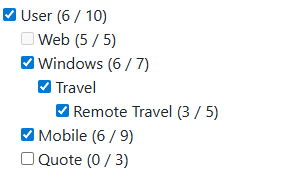
How do user plans affect my app?
A customer can choose one of the following billing periods for their CRM solution:
- Once a month
- Every 3 months
- Every 6 months
- Annually
The contract period is for 12 months. After the first 12 months, they are automatically renewed for another billing period, according to their choice.
Customers can combine plans that best fit their needs. They can also add or change user plans later on.
You should keep this flexibility in mind when integrating with specific features and deciding your pricing model.