Module licenses
The license system uses three main database tables:
- ModuleOwner — an issuer of licenses. Initially only one row (SuperOffice). Contains global expiration dates.
- ModuleLicense — one row per license. The admin panel shows only a subset; many licenses are hidden. Field details are covered below.
- LicenseAssocLink — assigns one module license to one associate.
| Field | Description |
|---|---|
| ModuleName | Code name: the "user" part of superoffice.user |
| ModuleDescription | Display name, shown in admin |
| ModuleTooltip | Tooltip shown in admin |
| ModuleVersion | Product version license was issued to: "10.1" |
| LicenseType | System/site/user |
| NumberOfLicenses | Quantity |
| Unrestricted | Do we care if the number is exceeded or not |
| IsHidden | True/false - show the license in admin? |
| ExtraInfo | Licenses that are implied by this license. |
| ExtraFlags | 1 for user plans, 0 for everything else. |
| PrerequisiteModuleName | You must have this module on before you can activate this license. |
Module licenses all have an owner, usually "SuperOffice" for us, but partners can define their own licenses, and run their own license servers.
Module license names are often written superoffice.something, but the ModuleName is just "something". The owner name is prefixed to distinguish licenses from different owners.
The full list of licenses are in SoLicenseNames.
This list is included in the webApi client package, and is used on the license server (via Nuget package) for consistency.
License type
- Site licenses are global - apply to all users, do not require assignment.
- Satellite licenses are database specific - useful when you have multiple sites, and a feature is only licensed to specific locations. Satellites was a thing we used to have, but has now gone away as we moved on-line.
- User licenses are user-specific - and need to be assigned to a particular user.
Hidden
Modules that are hidden are not shown in the admin panel. The licenses still exist and can be checked for, they just aren't visible in admin.
Hidden site licenses still apply to everyone.
Hidden user licenses need to be assigned. This is handled by the user-plan license having a list of the hidden user licenses to assign to the user listed in the ExtraInfo field.
Number of licenses
How many licenses has the user actually purchased.
This number is never 0, even when the Unrestricted flag is true.
Unrestricted
User and Satellite licenses are usually restricted. In other words, admins are not allowed to assign more than the paid-for number of licenses.
If the unrestricted flag is true, then there is no restriction, and the admin can assign as many as they want, even if the number of licenses is 1.
The visible-for license is unrestricted, since we do not charge extra for confidential appointments.
The quote-cal license is restricted, because we do charge extra for user access to quotes. Back when licenses were sold individually, you could buy 10 user licenses, and only 3 quote-cals. These days quote-cals are packaged into the user plan, so the need for separately controllable licenses is
Extra flags
- 0 for most licenses.
- 1 for user-plans - user licenses that enable hidden user licenses.
- 2 for site-level markers that mark user-plan descriptions.
Extra info
For a user-plan (extra flag = 1), the extra info will most likely be "set=user,web,quote-cal,project-cal,etc,etc".
The "set=" is a command, and the rest is a list of hidden user-licenses to assign to the user when this user-plan is selected.
Prerequisites
In 7.x the licenses were sold loosely, so a web user required a user license in order to be activated.
| Licenses | Number | Unrestricted | Prereq |
|---|---|---|---|
| user | 10 | ||
| web | 5 | user | |
| windows | 7 | user | |
| travel | 7 | true | windows |
| remote-travel | 5 | travel | |
| pocket-cal | 9 | user | |
| quote-cal | 3 | user |
Which would render in the user license panel as a series of nested checkboxes:
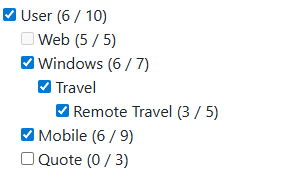
You could not enable the windows license without first checking the user license.
The travel license is unrestricted, so it does not have a counter to disable it.
User-license assignment
LicenseAssocLink assigns one particular module license to one associate. That is how a user gets both a user license and a web license — each assignment is one record.
The sum of licenses assigned to any particular module is limited to the number in ModuleLicense. A new license set from SuperLicense will not be accepted if more than the acquired number is already assigned.