Hidden licenses
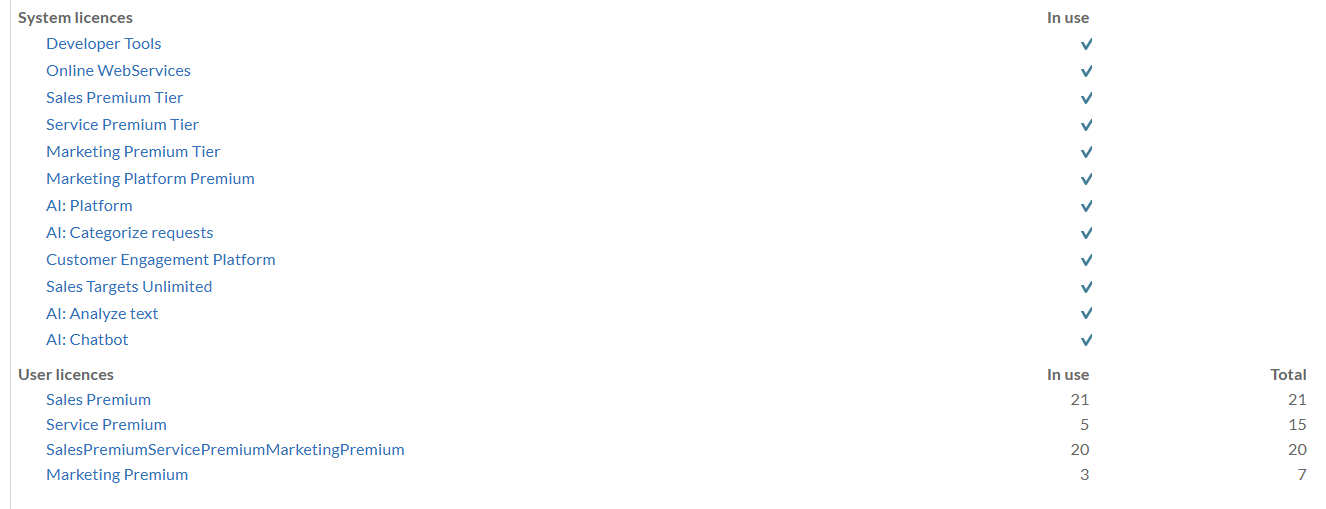
The user sees a set of licenses in the admin panel, including user-plans and markers of purchased add-ons:
The actual license contains many more licenses than shown in the admin screen:
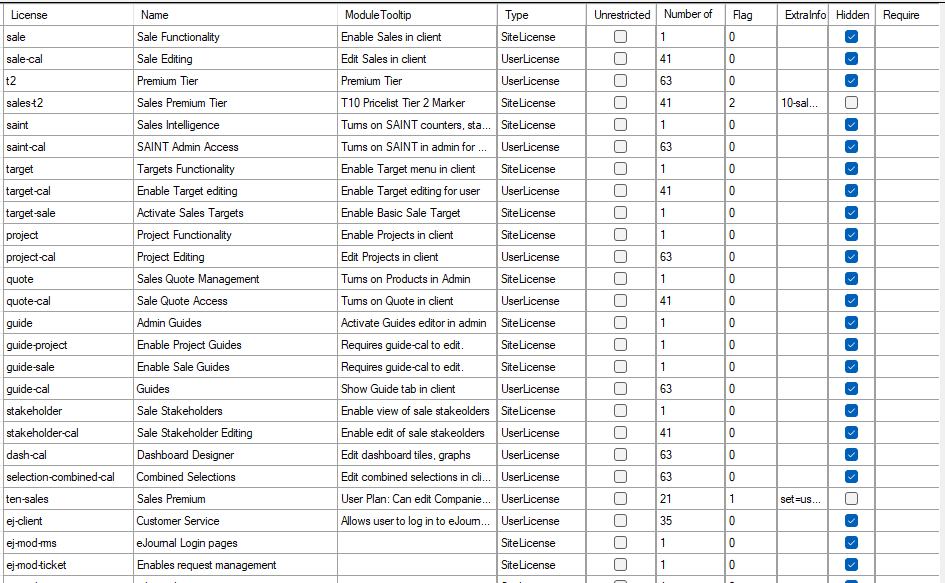
These include the licenses shown to the user like service-t2 (site license) and ten-service (user plan license), as well as the hidden module licenses like the stakeholder site license, and the stakeholder-cal user license.
License package
The license server delivers a cryptographically signed set of site and user licenses. The fields in the modulelicense fields are described separately.
<AdminWarningDate>2027-02-27T00:00:00</AdminWarningDate>
<CompanyName>Designteamet</CompanyName>
<DeploymentType>1</DeploymentType>
<ExpiryDate>2027-03-27T00:00:00</ExpiryDate>
<GraceDate>2027-04-08T00:00:00</GraceDate>
<LicenseVersion>11.11</LicenseVersion>
<MaintenanceDate>2027-02-27T00:00:00</MaintenanceDate>
<ModuleLicenses>
  <ModuleLicense>
    <OwnerName>SUPEROFFICE</OwnerName>
    <LicenseType>SiteLicense</LicenseType>
    <ModuleName>expander-services</ModuleName>
    <ModuleDescription>Development Tools</ModuleDescription>
    <ModuleTooltip>Activates CS Extra Tables, External Users, ERP Sync, Custom Apps</ModuleTooltip>
    <ModuleVersion>11.11</ModuleVersion>
    <NumberOfLicenses>1</NumberOfLicenses>
    <Unrestricted>false</Unrestricted>
    <IsHidden>false</IsHidden>
    <SortOrder>1</SortOrder>
  </ModuleLicense>
  <ModuleLicense>
    <OwnerName>SUPEROFFICE</OwnerName>
    <LicenseType>SiteLicense</LicenseType>
    <ModuleName>config-screens</ModuleName>
    <ModuleDescription>Configurable Screens</ModuleDescription>
    <ModuleTooltip>Configurable screens on built-in screens</ModuleTooltip>
    <ModuleVersion>11.11</ModuleVersion>
    <NumberOfLicenses>1</NumberOfLicenses>
    <Unrestricted>false</Unrestricted>
    <IsHidden>true</IsHidden>
    <SortOrder>7</SortOrder>
  </ModuleLicense>
  <ModuleLicense>
    <OwnerName>SUPEROFFICE</OwnerName>
    <LicenseType>UserLicense</LicenseType>
    <AllowedUserType>InternalAssociate</AllowedUserType>
    <ModuleDescription>User login</ModuleDescription>
    <ModuleName>user</ModuleName>
    <ModuleTooltip>Allows user to log in half-way. You also need a client license.</ModuleTooltip>
    <ModuleVersion>11.11</ModuleVersion>
    <NumberOfLicenses>63</NumberOfLicenses>
    <Unrestricted>false</Unrestricted>
    <IsHidden>true</IsHidden>
    <SortOrder>35</SortOrder>
  </ModuleLicense>
  <ModuleLicense>
    <OwnerName>SUPEROFFICE</OwnerName>
    <LicenseType>UserLicense</LicenseType>
    <AllowedUserType>InternalAssociate</AllowedUserType>
    <ModuleName>ten-sales</ModuleName>
    <ModuleDescription>Sales Premium</ModuleDescription>
    <ModuleTooltip>User Plan: Can edit Companies, Diary, Sales, Selections, Reports</ModuleTooltip>
    <ModuleVersion>11.11</ModuleVersion>
    <NumberOfLicenses>21</NumberOfLicenses>
    <Unrestricted>false</Unrestricted>
    <IsHidden>false</IsHidden>
    <ExtraFlags>1</ExtraFlags>
    <ExtraInfo>set=user,web,pocket-crm-cal,selection-cal,relation-cal,report-cal,chat-cal,forms-cal,sale-cal,t2,saint-cal,target-cal,project-cal,quote-cal,guide-cal,stakeholder-cal,dash-cal,selection-combined-cal</ExtraInfo>
    <SortOrder>73</SortOrder>
  </ModuleLicense>
As you can see, some licenses are hidden, and some are not. The hidden licenses are either site licenses (and thus on for all users automatically), or user licenses, which are turned on by the "set=..." ExtraInfo in the user-plan license.
The ModuleNames can be referenced from SoLicenseNames.