Marketing 11.13 update
Forms - Add custom contact and company fields
Custom contact and company fields can now be added to forms, making it possible to collect and update more of the information your team works with every day.
Previously, only a limited set of standard fields was available in the form builder.
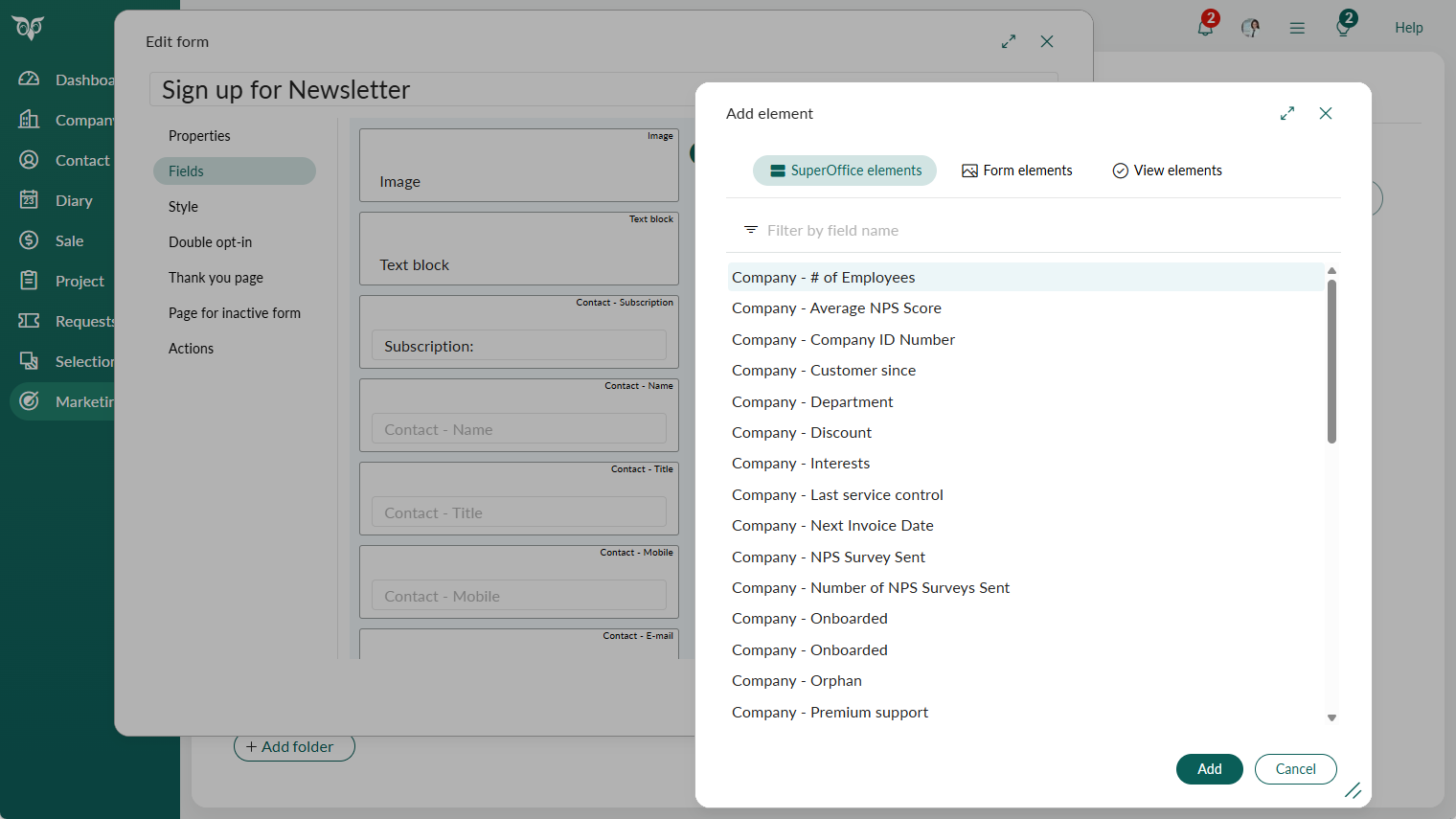
Open the form builder and add fields from the contact or company field list.
Standard fields added for contacts include preferred language, birthday, business, and interests. For companies, department, business, and interests are available. Custom fields (user-defined extra fields — UDEFs — and extra fields) of all types are also available, with the exception of read-only fields and relation fields. When the field list is long, you can search by name to find the right field quickly.
When adding a field that supports overwrite, selecting "Allow overwrite of existing data" (previously labeled "Replace") displays a warning, so you are aware of the risk before publishing the form.
Tip
When sending a mailing with a link to a form, you can pre-populate fields with data already known about the contact. Go to Publish and use the pre-populate variables for the fields included in your form.
Note
If you see that a field no longer offers the overwrite option, or is not available in the form builder at all, your CRM administrator may have restricted it. Contact your administrator if you need access.
Read more about managing form field restrictions in Settings and maintenance. Read more about adding fields to a form.