Settings and maintenance 11.12 update
Requests - Add relation rules
Relation rules let you control how linked requests behave when using request relations. They are used to guide parent–child handling in more complex workflows and ensure that related requests follow a consistent process.
Relation rules apply when specific request types are linked (for example, when one request is set as the parent of another). These rules define automatic behaviour in the request UI, helping agents follow the intended workflow.
When creating a rule, you define the source request type, relation type and target request type. You can then add conditions and choose which behaviours should be applied to that combination. Available behaviours include:
- Require parent on creation: ensures a parent request must be selected when creating certain request types.
- Prevent parent closure: blocks users from closing a parent request while child requests are still open.
- Offer to close parent: prompts the user to close the parent when all child requests are resolved.
- Offer to close children and send message: when closing a parent request, prompts the user to close all child requests and send a predefined message to each.
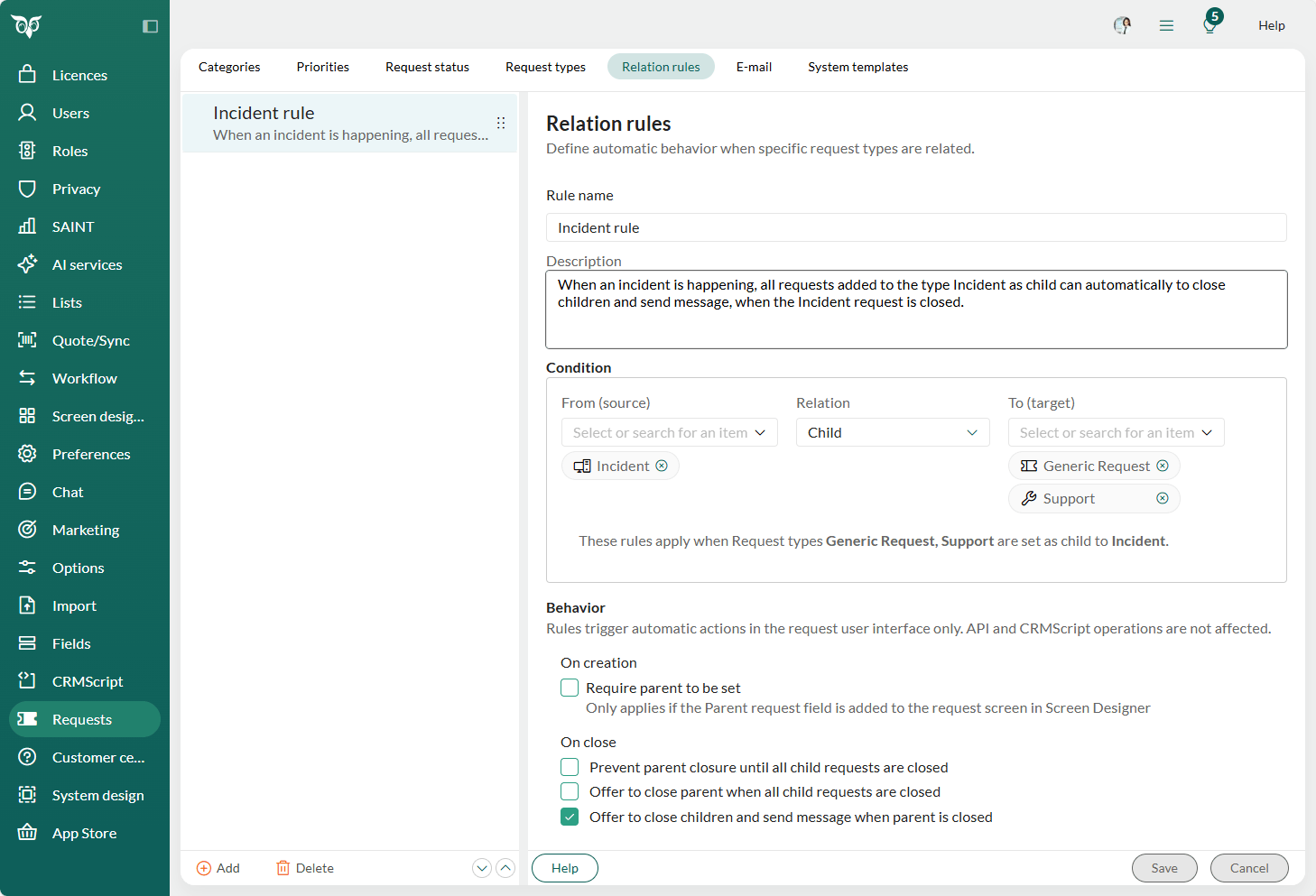
These behaviours trigger only in the request UI and help automate steps that would otherwise be manual. A typical use case is incident handling. For example, if "Incident" is the parent of multiple Support requests, you can configure the system to automatically close all child requests and send a message to each customer once the incident is resolved.
Relation rules improve control, visibility and efficiency when working with interconnected requests, especially in structured or complex support environments.
Read more about how to use related requests in SuperOffice Service.
Learn more about how to set up your relation rules in Settings and maintenance.