How to implement a web panel that detects if it is running inside SuperOffice web
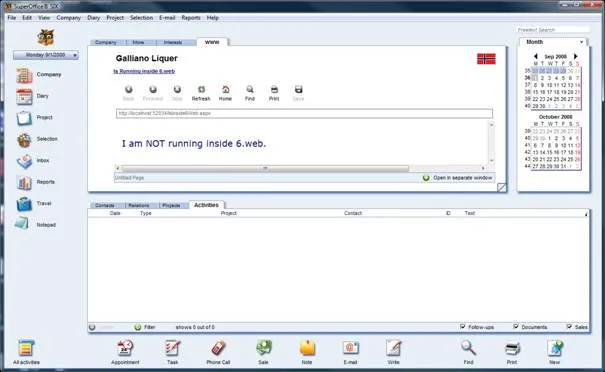
In this example, we have created a simple ASPX page, which displays the text “I am running inside SuperOffice web” if the page is referred to from SuperOffice web iframe and “I’m NOT running inside SuperOffice web” if otherwise.
As elaborated below, the custom header X-SuperOffice-ModuleVersion is used to determine whether being referred by SuperOffice web. This value is set only when the web panel is called from 6.win and never by a normal browser.
// Reads the value for the custom header 'X-SuperOffice-ModuleVersion'
string moduleVersion = HttpContext.Current.Request.Headers["X-SuperOffice-ModuleVersion"];
if (String.IsNullOrEmpty(moduleVersion))
  {
    this.lblStatus.Text = "I am running inside SuperOffice web";
  }
  else
  {
    this.lblStatus.Text = "I am NOT running inside SuperOffice web.";
  }
How to add a web panel to SuperOffice
This can be done using SOADMIN console as shown below.
-
Click List on the left. This opens the Lists tab which displays a list that consists of user-defined lists.
-
Double click Web Panel which takes you on to the Items tab.
-
Click Add at the bottom and you are directed to the properties window of the new web panel.
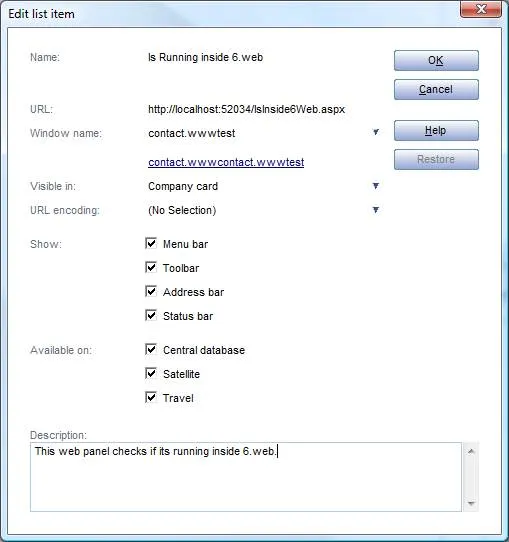
The following figure shows the properties of the web panel. We have set the URL of the web page created above.
Following are the screenshots of the web panel running in SuperOffice web and 6.win.
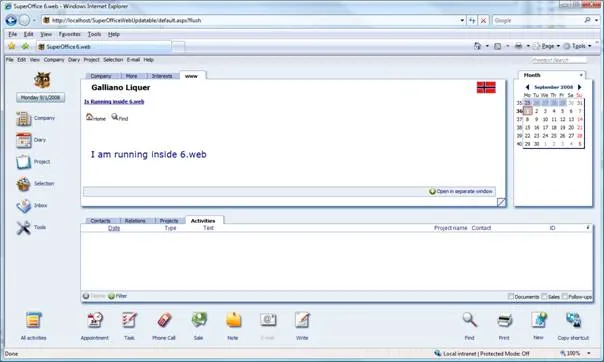
In 6.win it displays “I am NOT running inside SuperOffice web” as shown above whereas the message is “I am running inside SuperOffice web” in SuperOffice web.