Mobile CRM 11.1.9 update
Audience:
•
Version: 11.1.9
Some tooltip text!
• 1 minute to read
• 1 minute to read
Lead categorisation - Automatic update of category on sale sold or lost
Managing leads often requires quick updates across multiple places. With Lead management, category updates for companies and contacts are now handled more automatically, where you set up different rules when sale is sold, lost, or registered.
When a sale linked to a lead is marked as Sold, the category is automatically updated to the configured target category. You can also choose to prompt the user with a confirmation before updating the company or contact category.
Company - Indicators for country and stop
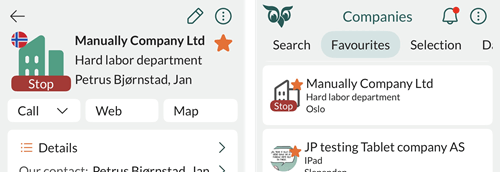
To work more efficiently with companies, it's important to understand key information at a glance. The company list now displays:
- The company's country (as a flag)
- The Stop indicator, if the company is marked with Stop (indicates special handling is required for the company)
This makes it easier to identify important restrictions or context directly from the list view.