Settings and maintenance 11.10 update
Marketing - Subscription page styling
All contacts added to SuperOffice CRM receive a Privacy confirmation email that includes a link to their subscription settings. From here, they can easily manage which mailings they want to receive from your company.
This subscription page link is also included in all mailings, allowing contacts to update their preferences at any time. The same subscription types are used when creating a mailing, ensuring consistency when selecting the mailing type you want to send.
You can customise the look and feel of the subscription page from Marketing in the navigator, under the Subscription page styling tab, where you have a Styling and an Options section. Any changes you make are shown immediately in the preview on the right-hand side.
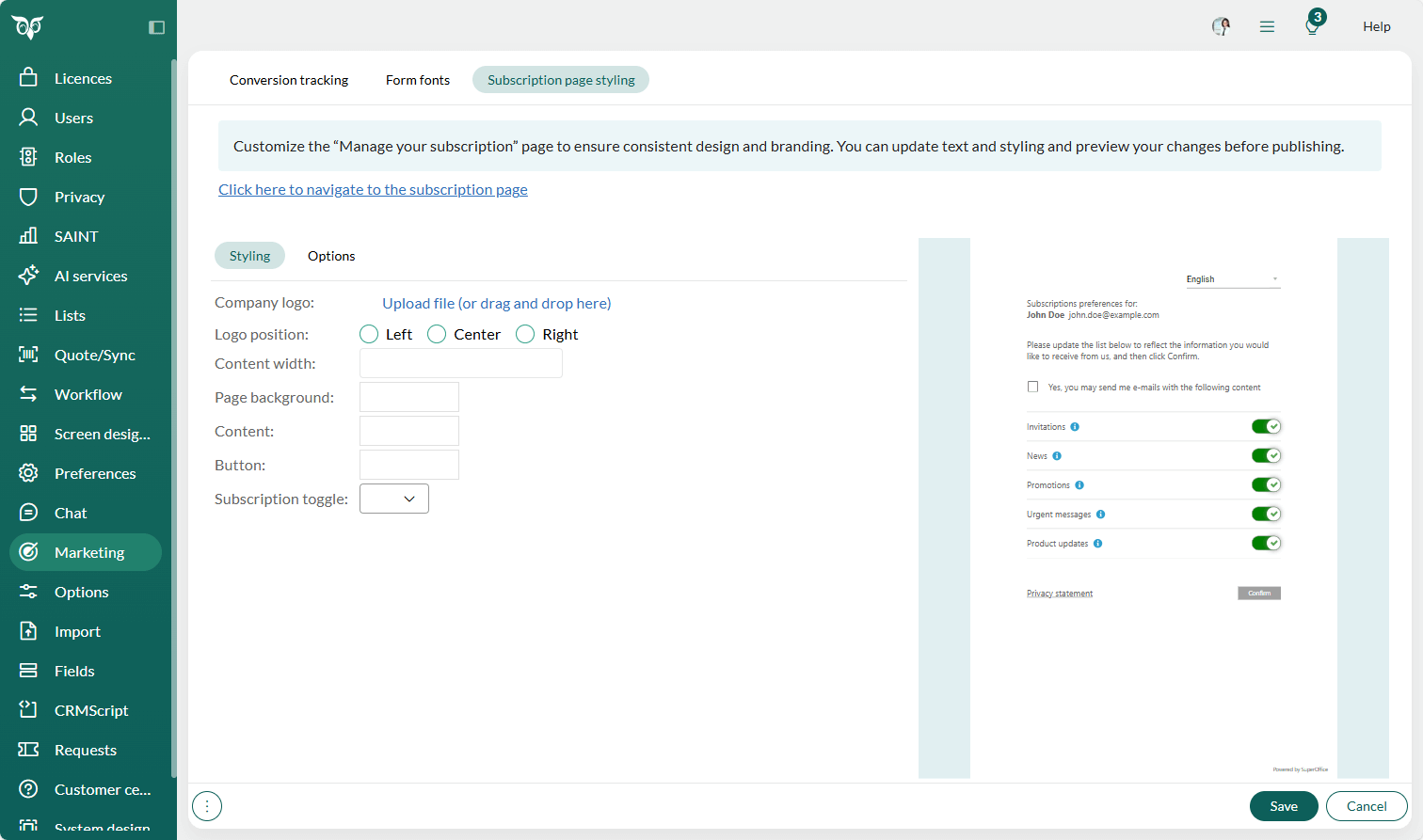
Styling section: You can add your company logo and adjust its position, set the page width and background, and style the content, buttons, and subscription toggles.
Options section: You can customise the text for all supported languages. Simply select the desired language and update the Header, Instructions, and Consent text to match your tone of voice and branding. If you delete the text in any of the fields, it will automatically revert to the SuperOffice CRM default text.
Tip
You can remove languages you do not use in the Options section. This reduces the number of languages your contacts can select and simplifies your content maintenance. If your language setup changes later, you can easily add any language you previously removed.